


StorageTreasures Auction App
3.6318.00 Reviews
App Specs
- Version
- 1.22.0
- Updated On
- License
- Free
- Downloads
- 100,000+
- Developer
- OpenTech Alliance
- Categories
- Shopping
- Platform
- Android
Screenshots
 Analysis by AppCompare
I opened StorageTreasures with a very specific situation in mind: I wanted to see whether a phone could make the process of finding and bidding on nearby storage auctions feel practical, rather than turning it into another tab-heavy shopping task. Developed by OpenTech Alliance, this free shopping app is aimed at people who are comfortable buying items sight unseen and then dealing with the real-world work afterward. That last part matters. The auction itself may happen on a screen, but the useful outcome depends on what happens when you win.
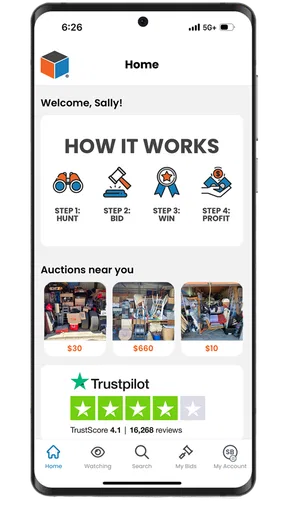
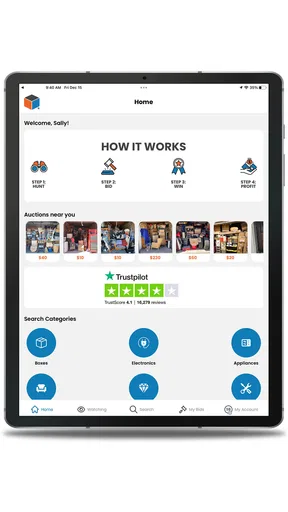
My first impression is that this is a focused tool, not a general marketplace. It is built around storage-unit auctions near your location, so the value comes from narrowing your attention to opportunities you might realistically be able to collect. The app has passed the early adoption stage, with more than one hundred thousand installs, yet its average score sits at 3.6 from roughly six hundred ratings. I read that combination as a reason to approach it with interest but not blind enthusiasm: enough people are using it to make the concept worthwhile, while the rating suggests that the experience can depend heavily on the auction, the seller, and the buyer’s preparation.
From a casual search to a real pickup plan
I use the move from browsing to a pickup plan as the point where a promising auction becomes a sensible decision. Before I let an interesting listing pull me toward a bid, I match its location and timing to my transport, available help, and space to sort the contents. That practical check also makes it easier to decide which opportunities are worth watching and which are better left alone.
Starting with the right kind of buyer
Before installing it, I would ask myself a simple question: am I looking for ordinary online shopping, or am I willing to accept uncertainty? StorageTreasures is much closer to the second option. You are not browsing neatly described products with predictable delivery. You are looking at storage contents where the available information may be visual, incomplete, or dependent on the auction details. That makes the app interesting for resellers, bargain hunters, flea-market sellers, collectors, and people who already understand how much time sorting and transporting can take.
It is less suitable for anyone who needs a guaranteed item, a precise condition report, or a straightforward checkout-and-delivery experience. If I needed a replacement appliance by the weekend, I would use a conventional retailer or a normal second-hand marketplace. If I wanted to explore local opportunities and was prepared for a mixed result, this app would make more sense.
The mature age classification is also relevant. It does not make the app inappropriate for every younger user, but it signals that this is an adult-oriented purchasing environment. I would treat it as a practical reminder to understand the financial and logistical responsibility before bidding, especially if another person is helping with transport or storage.
Finding auctions that are genuinely local
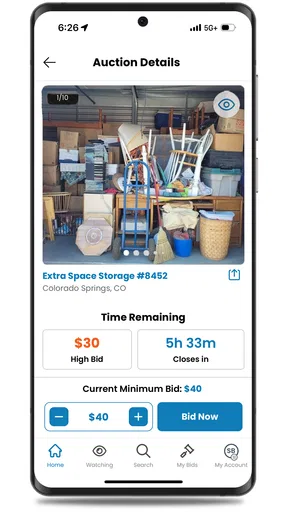
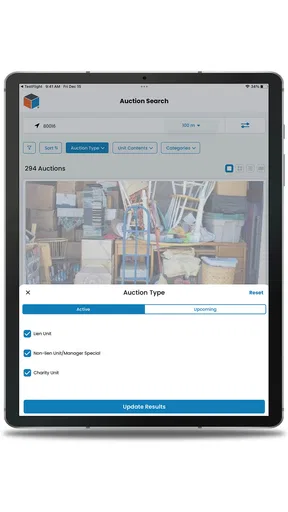
The first useful step is not bidding. It is filtering your attention. A nearby auction may still be inconvenient if the collection window does not fit your schedule, if you do not have a suitable vehicle, or if the contents would need more storage than you can provide. I would begin by looking through the available local listings and noting the location, timing, visible contents, and any instructions attached to the auction.
Worth Reading Before You Choose

EA SPORTS FC Mobile 26 Is a Bigger Football Game, but It Takes Time

Flipboard Shows What News Apps Must Do Beyond the Feed

Switching to Android Auto Means Rethinking Your Driving Routine

Google Calendar Makes a Crowded Week Easier to Manage

Ludo King Makes the Most of the Minutes Between Plans

Baby Panda World Brings Quick Play to Modern Phones, but Its Game Library Feels Busy
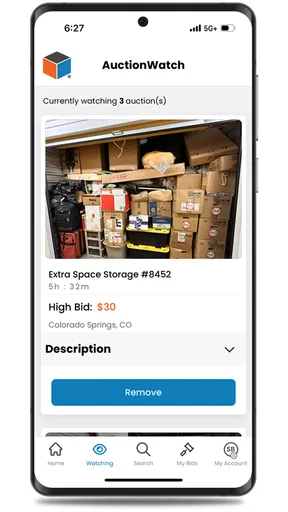
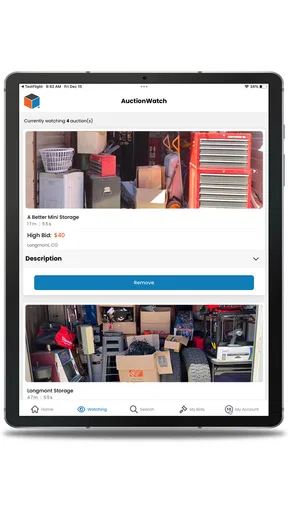
This is where the phone format helps. I can check opportunities while away from a computer, save the ones that deserve a closer look in my own notes, and compare them against my calendar. The app’s central promise is discovery and bidding from a phone, but the more valuable habit is using that access to eliminate unsuitable auctions early. A cheap-looking unit is not cheap if collecting it requires a rushed rental van or several trips.
One practical tip is to separate “interesting” from “actionable.” An auction can contain items that look resalable, yet still fail the actionable test because I cannot estimate the volume, handle the pickup, or move the heavy pieces. I would only keep a listing in my serious shortlist after checking whether the likely contents match my equipment, helpers, and available space.
Reading a listing without fooling myself
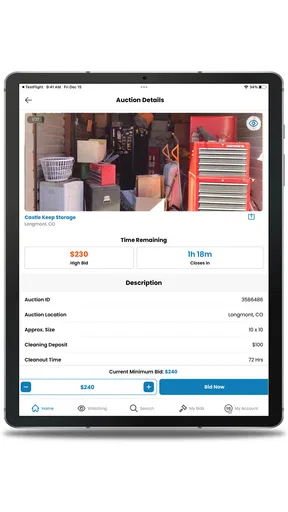
Storage auctions encourage optimistic guesses. A visible box can suggest valuable contents, and a recognizable brand can make the whole unit appear more attractive than it really is. I found it more useful to inspect the listing like a risk assessment: what can I identify, what is hidden, what might be damaged, and what would be difficult to dispose of?
I would also avoid building a bid around one exciting object. The unit is a bundle, and the less desirable material comes with the desirable material. Clothing, damaged furniture, broken household goods, and ordinary rubbish can consume the time that made the purchase seem worthwhile. The app can bring the opportunity to my screen, but it cannot replace a realistic estimate of sorting, cleaning, transport, and disposal.
A second non-obvious tip is to calculate a personal ceiling before the bidding becomes emotional. I would write down the highest amount I can justify after allowing room for fuel, helpers, cleaning supplies, and unwanted items. That ceiling should be based on the whole unit, not on the best object visible in a photograph. Once I reach it, leaving is often the most profitable result.
Placing a bid with the handoff already in mind
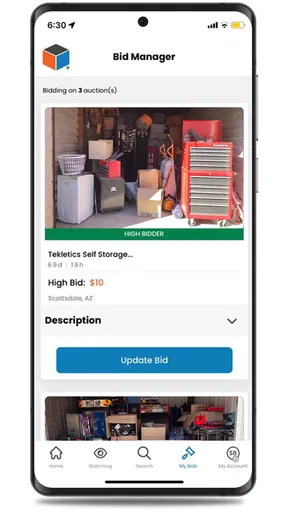
The bidding stage is only one link in the chain. Before I submit anything, I would make sure I understand what winning would require from me. Can I be available when collection is expected? Do I have access to a vehicle? Can I bring boxes, gloves, straps, or a dolly? If the unit contains large furniture, do I have a second person to help?
This preparation changes how I use the app. Instead of treating a bid as a small online decision, I treat it as a commitment that may create several offline tasks. The phone makes it easy to act quickly, which is convenient, but that convenience can also encourage impulsive bidding. I would pause after finding an appealing unit and confirm that the practical handoff is possible before committing.
The app is free to download, which lowers the barrier to exploring the marketplace. That does not mean the activity itself is cost-free. The purchase price is only part of the outcome, and the app should be viewed as the doorway to a local transaction rather than the complete transaction experience. This distinction is particularly important for newcomers who are used to shopping apps showing the final delivered cost.
What happens after the auction decision
If I win, my workflow moves away from browsing and toward coordination. I would immediately review the relevant auction information, note the collection requirements, and organize the people and equipment needed. This is the point where a second screen or a written checklist becomes useful. The app helps me access the opportunity, but my calendar, vehicle, and storage plan determine whether the result is manageable.
For example, imagine I notice a unit near my usual route on a weekday. The pictures show several pieces of furniture and a stack of sealed-looking containers. Instead of bidding simply because the location is convenient, I would check whether I can collect everything in the available window, whether my vehicle can handle the load, and whether I have somewhere dry to sort it. If I win, I would photograph the unit before moving anything, separate items into keep, sell, donate, and discard groups, and avoid mixing potentially valuable pieces with rubbish during the first pass.
That workflow may sound obvious, but it is where many auction purchases succeed or fail. The app can help me discover and pursue the unit; it cannot make the pickup orderly. A buyer who plans the handoff before bidding is likely to have a much better experience than someone who treats the auction as a low-cost mystery box.
Sorting the result instead of judging it too early
The outcome should not be judged the moment the door opens. A storage unit can look disappointing at first and still contain sellable items after cleaning, testing, or researching. The opposite is also true: an impressive first view can conceal damaged goods and a large disposal burden. I would give myself a structured sorting process rather than relying on excitement.
My first pass would be about safety and separation. I would keep fragile items apart, avoid powering unknown electronics without checking them, and create a clear area for things that need cleaning. My second pass would identify items that can be sold quickly through local channels, items worth listing online, and items whose value is too low to justify the effort. This is one of the strongest use cases for experienced resellers: the app can provide a stream of inventory opportunities, but only if the buyer has a repeatable method for processing them.
For an occasional buyer, the result may be less about profit and more about an unusual local find. That can still be worthwhile, but the standard for success should be honest. If I spend a weekend sorting, several trips collecting, and additional time disposing of unwanted material, I should count that effort as part of the cost. A unit is not a bargain merely because the bid was low.
Where the flow becomes frustrating
The biggest weakness is built into the category: uncertainty. A mobile interface can make listings easy to reach, but it cannot remove the unknown condition of stored goods or guarantee that a promising photograph represents a profitable haul. The app’s 3.6 average rating reinforces my impression that convenience does not eliminate the rough edges of this kind of marketplace.
I would also be cautious about relying on the app alone for planning. A listing may be easy to discover, yet the real work involves timing, transport, communication, sorting, and disposal. If any one of those handoffs fails, the attractive part of the experience can quickly become stressful. The buyer has to keep track of details instead of assuming that a normal shopping-app workflow will carry everything through automatically.
Another friction point is emotional bidding. Because the app puts opportunities close at hand, it can encourage repeated checking and quick decisions. I would avoid bidding while distracted, tired, or unable to verify my pickup plan. A written limit and a prepared transport plan are more valuable safeguards than simply browsing more listings.
There is also a clear trade-off between discovery and predictability. A traditional resale marketplace is better when I want to search for one known item and compare condition, seller history, and price. A thrift store is better when I prefer to inspect goods physically before buying. StorageTreasures is better when I enjoy the possibility of finding a mixed lot and can accept that some of the value will be hidden, unusable, or time-consuming to recover.
Who should install it, and who should skip it
I would recommend trying StorageTreasures if you live near participating storage-auction opportunities, have a realistic way to collect bulky goods, and enjoy evaluating uncertain inventory. It can be especially useful for someone who already sells furniture, household items, clothing, tools, or collectibles and wants another source of local stock. The app’s free price makes experimentation easier, provided the user treats each bid as a serious purchase decision.
I would skip it if I have no transport, no temporary storage, or no time to clear a unit promptly. I would also avoid it if I dislike negotiating with uncertainty or need reliable product descriptions. People who are new to reselling may enjoy the discovery, but they should begin cautiously rather than assuming that a visible brand or full-looking room guarantees value.
On the technical side, the app is available for devices running Android 7.0 or later, and the current version is 1.22.0. That makes it accessible to many older Android phones, although I would still keep the device updated and make sure notifications and account access work before relying on the app for an auction deadline. The developer, OpenTech Alliance, has kept the product focused on its storage-auction purpose rather than turning it into a broad shopping catalog.
My final take after following the whole workflow
StorageTreasures works best when I use it as the first step in a larger buying process, not as a shortcut to effortless bargains. It brings local storage-auction opportunities into a phone-friendly format, which is genuinely useful for checking listings, deciding what deserves attention, and acting when a suitable opportunity appears.
Its real test begins after the bid. The buyer must connect the app to a calendar, a vehicle, helpers, sorting space, and a realistic resale plan. That handoff from digital discovery to physical collection is both the app’s defining appeal and its main source of friction. I like the concept, but I would recommend discipline over excitement: inspect carefully, set a firm ceiling, plan the pickup first, and assume that every unit includes work that is not visible on screen.
For the right person, this free shopping app can become a useful local-auction companion and a source of inventory that ordinary marketplaces do not offer in the same way. For someone seeking predictable purchases, delivery, and known condition, another shopping option will be more comfortable. My recommendation is therefore positive but specific: install it if you want to explore storage auctions and are ready for the hands-on outcome, not merely the thrill of placing a bid.
Pros
- Browse storage auctions and listings from your mobile device.
- Detailed item photos help assess lots before placing a bid.
- Search and filters make it easier to find nearby auctions.
- Auction updates and notifications can help you track activity.
- Useful for discovering local deals on varied merchandise.
Cons
- Some listings may have limited descriptions or unclear item details.
- Travel costs can reduce savings when winning distant lots.
- Auction rules and pickup deadlines vary between facilities.
- Competitive bidding may quickly raise prices above expectations.
- The app’s usefulness depends on available auctions in your area.
FAQs for StorageTreasures Auction App
What is the StorageTreasures Auction App?
StorageTreasures Auction App is a mobile platform for browsing and participating in online storage-unit auctions. Users can explore listings, view available information and photos, follow auction activity, and place bids when eligible. It is designed for people interested in purchasing abandoned or unclaimed storage units, but auction availability and features may vary depending on location and the specific listing.
How do I participate in an auction through the app?
To participate, you generally need to create an account, complete any required profile or verification details, and review the auction’s terms before placing a bid. Each listing may include a closing time, buyer requirements, payment information, and pickup instructions. Before bidding, check all conditions carefully because submitting a bid can create a binding purchase obligation.
Are the items inside a storage unit guaranteed to be accurately described?
No. Storage-unit auctions are usually sold as-is, and the photos or descriptions may not show every item or condition inside the unit. Some belongings may be hidden, damaged, incomplete, or difficult to identify from the listing. Review the available images and details carefully, and consider potential cleaning, transportation, disposal, and repair costs before deciding how much to bid.
What additional costs should I expect after winning a unit?
The winning bid may not be the only amount you pay. Depending on the auction and facility, additional charges can include buyer premiums, taxes, cleaning deposits, late fees, payment-processing costs, transportation, and disposal expenses. You may also need to remove all contents within a specified deadline. Always read the listing’s payment and pickup rules before placing a bid.
Is StorageTreasures Auction App safe and available on every device?
The app can provide a convenient way to access storage auctions, but users should still protect their account and verify every transaction through the official platform. Availability, supported features, and auction coverage may differ between Android, iPhone, and regions. Download it only from an official app store, use a strong password, and contact the facility or platform support if listing details appear unclear.


